I built my own library organiser to scan books
I have a couple hundred books. I need to know if I have something already or not, especially when I’m in a bookstore and judging a book by its cover. I need an organiser. There are already apps for this very purpose of course. But…
Scan individual barcodes? No thanks, I’ll build something from scratch instead so I can just upload multiple book spines together.
And so I did. Presenting: Chrollo
I’ve built an MCP server before this, but this was my first time building something more…well, “agentic”. I could’ve kept the LLM part limited to image scanning and use APIs for the CRUD part, but I wanted to have the option to “talk” with my library.
What exactly is Chrollo?
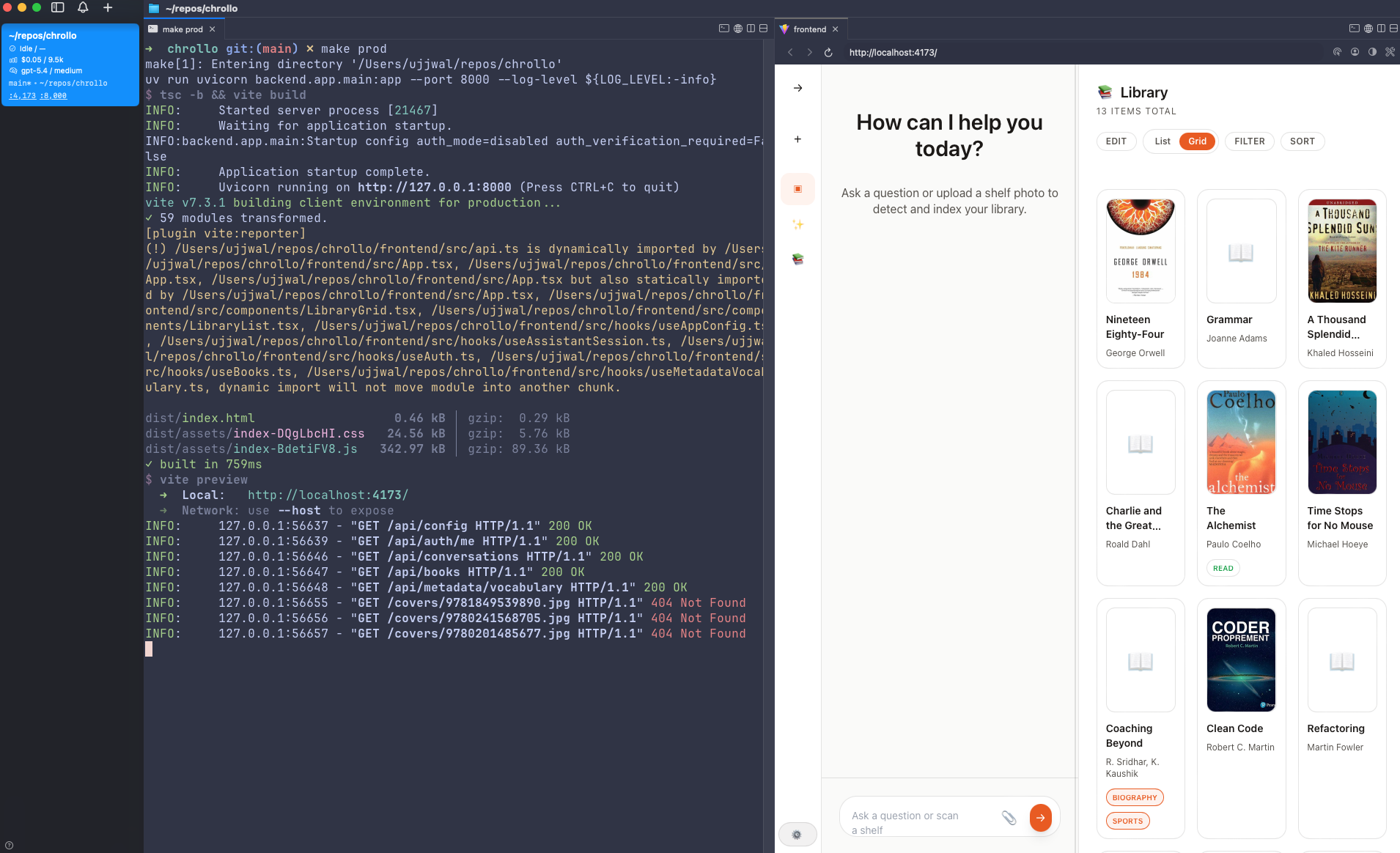
Chrollo is a library manager with an AI on top. It leverages LLMs to identify books in uploaded images, whether these images show covers or spines, and whether they contain one book or multiple. Post detection, it fetches details via OpenLibrary and preferentially uses them for title, author, and ISBN. An optional draft check allows manual intervention before saving the books to an SQLite database. Once books are added, the ISBN is used to asynchronously fetch book covers.
Beyond image detection, Chrollo has tools for CRUD operations, so it can manage the library via AI chat. Alternatively, the library can be managed via the UI manually, including adding books. The usage of LiteLLM for the app allows easy switching between models, including local ones.
Why LiteLLM?
I wanted minimal abstraction over the APIs I’d call, to understand them better rather than wave away any complexity. So, I didn’t want to use the agents SDKs from the big labs like Google, OpenAI or Anthropic. I also wanted to remain vendor agnostic. Hence, I settled on LiteLLM (thankfully, this was before the security incident they faced).
Superpowers are (were?) fun
This was my first project where I was working with a non-vanilla harness – OpenCode with gpt-5.2 & gpt-5.3-codex, compared to using Gemini CLI for the aforementioned MCP server with barely any skills on top. I’d set up a few skills, primarily superpowers. I loved the planning skill the most – it writes detailed plans with red/green TDD, splitting up the work to be done in concrete steps (see one of the plans to get an idea).
I say “loved”, because between the time I worked on the project and this blog, LLMs have advanced significantly. And with that progress, having extremely specific plans for implementation seems overkill. I see this with other superpower skills too, which now seem like extra context for no reason, when the LLMs are more capable of following explicit instructions provided by a few words without dedicated skills. This is not to say planning is useless; rather, about exploring the effectiveness of broader, leaner plans over narrow and specific ones, and whether direct prompts are just as effective at it than dedicated skills.
Stumbling onto the tool loop
After defining the required tools, I began testing, in the hope that everything would now work end to end. But it didn’t. The workflow would stop after a single tool call. On debugging, I figured out that I’d missed the most fundamental part of building an agent – it should be able to call tools in a loop. On rectifying, things finally started working as intended.
What would I do differently
Since this was a toy project and my first one with AI that had a user interface, I wanted to see how good of a UI I could build from scratch with my relative inexperience with frontend. While I achieved the UI that I envisioned, I would prefer using pre-made components like shadcn for future work.
Other tools I used and learnt while building Chrollo
- Agentation - UI annotations structured for feedback to AI agents. Has multiple levels of details one can choose to give along with the annotation. Simple integration with code.
- cmux - macOS terminal built for working with agents, including focusing on a panel and notifying when an agent is awaiting input, in-app browser, and more.